Sunday, July 21, 2013

Retry and Rollback using DB adapter - SOA Suite 11G

Hi All,

Retrying and rolling back transactions that got failed while invocation is one of the major things that needs to be keep in mind while designing the solution for any interface.As it helps in preventing any data discrepancy that can be there between source and target systems,had there not been any rollback in case of failed transaction.

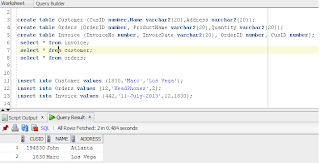
I will be demonstrating,how to retry and rollback failed transactions in SOA.To illustrate this use case I will be using one JMS queue from where our composite will consume the message and, after that it will insert data in 3 tables that I have created for this usecase.you will be requiring XA JNDIs both for Database and JMS Adapters.

Three tables have been created namely Customer,Order, and Invoice.Our SOA process will insert records in table in the same order.
On weblogic console,we need to set some properties for our jms queue for retry functionality.Just go to your jms queue and navigate to "Delivery Failure" tab for your queue.Set following parameters
  • Redilvery Delay Override: 10000 (10 seconds) It is the interval after which rolledback messages will be retried.
  • Redilvery Limit: 2 (Number of times failed message will be retried).
  • Expiration Policy: Redirect (or Discard, if you want to discard the message after retry) Redirect will move the message to "Error Destination" if even after configured retry parameters message is failed.
  • Error Destination: <Queue Name> Queue to which failed message will be moved after all retry attempts.
In the BPEL process, add catch or catch all handler for your composite to handle any faults that may occur.In the Catch All block ,explicitly throw a rollback fault using throw activity.It will rollback the complete transaction i.e. undo all the data inserted in any of the tables and then request message will be rolled back to the jms queue.

NOTE: Any fault thrown using throw activity that is not being caught will result in rollback of complete transaction.


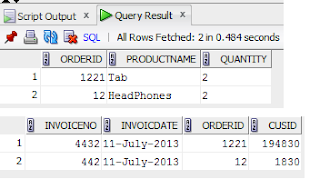
Now,first we will test the happy path.Deploy your code to EM and test the interface.Records will be inserted into all the tables successfully.
To see how rollback works,I will intentionally change the DB jndi for Invoice adapter.To do that open jca file for your Invoice DB Adapter and give some random value in that.Save and redeploy the code.Now the interface will fail while inserting the data in Invoice table and flow will got to Catch All block,where transaction will be rollbacked.
To validate this,check the tables and no new records would have been inserted into the tables.

Since we have configured,retry parameters for our request queue, the rollbacked message will be retried again after 10 seconds.Message state will be changed to "delayed" which means it is being retried.

After all failed attempts the message will be redirected into the error destination that we have configured for our queue.


In this way, you can implement retry and rollback functionality in your interfaces.
Hope this helps you.


Happy Learning,
Cheers !!!

Friday, July 19, 2013

Adding nodes and creating variables in XSL - Oracle SOA 11G

Hi guys,

Today I am gonna write about,how to use summation function in XSL and how to create a cariable and use it in your xsl. Actually,there was a requirement in our project,which was like adding some values of some fields in the input and based upon the sum we required to pass some value to the target system.So, to accomplish this we used sum function, that is available in xslt.

I will be demonstrating it taking one example.Suppose we have some fields that are coming in the input such as A,B,C and we need to add all these values and see whether its sum is greater than zero or less than zero.If the sum is greater than 0, we will pass say "pass" and if its other way around we will pass say "fail" to the target system.I have create a sample BPEL process for this usecase.Process is very simple: it is exposed as webservice and taking input from the client and after doing aforesaid transformation and logic will publish the message in jms Queue.I will just explain the XSL part.


Step1: In my transformation, first I will create a variable that I will be using to storing the sum of all the required nodes. So in your xsl on target node,right click and add variable "tempVar".
Step2: Drag and drop "Sum" function from Mathematical functions in the centre of xsl.
Step3: Now in the function add all the nodes that you want to add separated by "|".In this example I am adding surcharge,tax,vat,shipmentcharge nodes.


 <xsl:variable name="tempVar"
                select="sum((/imp1:employee/imp1:surcharge | (/imp1:employee/imp1:order/imp1:Tax | (/imp1:employee/imp1:order/imp1:VAT | /imp1:employee/imp1:order/imp1:shipmentCharge))))"/>


Step4: Based upon the sum we need to send value in the target XML.So in our case if its greater tha 0, We will send "Invocie" in typecode tag and "Credit MEmo" otherwise.To implement this add a choose when and otherwise condition. 
Step5: It will check the value of "tempVar" and based on the result,value will be set in the target xml.

Step6: Now deploy and test your composite. First we will test for positive vsalue.I have passed values in all the field greater than 0.As per our logic value in Typecode tag is sent as "INVOICE".
Step7: To check the opposite scenario,pass values such that sum is less than 0.Values now passed is "Credit Memo".
In this way we can use the sum function and also you learned ,how to create a variable in xsl and use that in your XSL.


NOTE: There can be scenarios where values in some nodes can be empty.So you have to handle that as well,otherwise,you will get "NaN" in your result.Hence in order to handle blank nodes use below expresssion:

sum((/imp1:employee/imp1:surcharge[. != ""] | (/imp1:employee/imp1:order/imp1:Tax[. != ""] | (/imp1:employee/imp1:order/imp1:VAT[. != ""] | /imp1:employee/imp1:order/imp1:shipmentCharge[. != ""]))))
  
Hope this post is useful to you guys.

Happy Learning,
Cheers !!!

Monday, July 15, 2013

High Availability and Scalability DB adpater - SOA Suite 11G

The Oracle Database Adapter supports two high availability setups.

  • Active-Active setup
  • Active Passive setup
In an active-active setup, distributed polling techniques can be used for inbound Database Adapters to ensure that the same data is not retrieved more than once.

Singleton behavior within an active-passive setup allows a high performance multithreaded inbound Oracle Database Adapter instance running in an active-passive setup, to follow a fan out pattern and invoke multiple composite instances across a cluster.

The Oracle Database Adapter also supports the high availability feature when there is a database failure or restart. The DB adapter picks up again without any message loss.

Distributed Polling

Often in production environments,servers runs in clustered mode i.e more than one managed server running under one cluster.Generally if we don't implement distributed functionality then say for eg we have 5 severs in clustered environment.Then in clustered env in case of polling DB adapter it is quite possible that all 5 nodes try to poll the same record at same time,which will result in 5 concurrent instances with same data.Clearly,we dont want that at all.

When we select Distributed polling while configuring DB adapter, it automatically uses the syntax SELECT FOR UPDATE SKIP LOCKED that means the same row cannot be processed multiple times.

SingleTon Behavior

As metioned under distributed polling,there may be times where it is best to improve performance on a single node, and then optionally do fan-out to multiple nodes in a cluster. Relying on concurrency control features of the database such as locking can be great, but these are often designed more for preserving data integrity than for high performance scalability.

The JCA Binding Component supports active fail over of inbound Adapter Services.To enable this fail over feature for a given inbound adapter endpoint, you must add the singleton JCA service binding property in the composite.xml within the <binding.jca> element and set it to a value of true as shown below:


      <binding.jca config="SchedulerPollDBAdapter_db.jca">
      <property name="singleton">true</property>
      </binding.jca>

 
Only one node of the cluster will poll for the record. If the active node goes down then other node of the cluster will active node and started polling for the record.   

Hope this post is useful to you guys.

Happy Learning
Cheers !!!

Thursday, July 4, 2013

Base64 Binary Encoding and Decoding - BPEL 11G

Hi Guys,

Sometimes there are requirements where we receives request from consumer in opaque/binary format or we may have to interact with applications using binary format.To facilitate this requirement Java embedding activity is used in BPEL.I will be demonstrating how to convert string to binary format and vice verse.

For this use case I have already created a BPEL process that will receive string in string format.In the BPEL code I have added 2 java embedding activities one for encoding and one for decoding the data.

Firstly, I will encode the payload received in binary format using below code:

addAuditTrailEntry("Encoding started");     
try {     
oracle.xml.parser.v2.XMLElement input = (oracle.xml.parser.v2.XMLElement) getVariableData("inputVariable","payload","/client:process/client:input");     
java.lang.String input_str = input.getTextContent();     
addAuditTrailEntry("Input String = "+input_str);     
oracle.soa.common.util.Base64Encoder encoder = new oracle.soa.common.util.Base64Encoder();         
java.lang.String encoded = null;        
encoded = encoder.encode(input_str);     
addAuditTrailEntry("encoded string = "+encoded);     
setVariableData("InputVar",encoded);     
} catch (Exception e) {     
  addAuditTrailEntry("Exception: "+e.getMessage());     
}     
addAuditTrailEntry("Encoded ended");

Pass the input variable name in the input string and create one more variable of 64binary format that will store the encoded string.
Now, we will decode the string that we encoded in previous step using below code:

 addAuditTrailEntry("decoding started");
String encodedString = (String)getVariableData("InputVar");
Base64Decoder Decoder = new Base64Decoder();
addAuditTrailEntry("encoded String = "+encodedString);
try
{
String decoded = Base64Decoder.decode(encodedString);
addAuditTrailEntry("decoded string = "+decoded);  
setVariableData("decodedString",decoded);
}
catch(Exception e)
{
  addAuditTrailEntry("Exception: "+e.getMessage());
}


Create one more variable of string type that will contain the decoded string.In this case we will pass the variable we created in previous step as input.Decoded string will be stored in variable we created for storing decoded string.
Now, we will test our composite to verify the changes we have made.String passed is encoded using 1st java embedding activity and decoded using second java embedding java activity.
Make sure you imported below mentioned classes in your BPEL source:

    <bpelx:exec import="oracle.soa.common.util.Base64Encoder"/>
    <bpelx:exec import="oracle.soa.common.util.Base64Decoder"/>

 
Otherwise your compilation will fail.
In this way you can achieve encoding and decoding functionality in BPEL.Hope this post is useful to you.

Happy Learning,
Cheers !!!

Monday, July 1, 2013

Saving Preference Variables Permanently - SOA Suite 11G

Hi All,

I would like to share one very useful information today related to preference variables in SOA 11G. Sometimes,you might have observed that you have changed the value for a preference variable but,after server restart it somehow got revert back to its original value. Weird isn't it !!!

Solution to this problem is very simple.

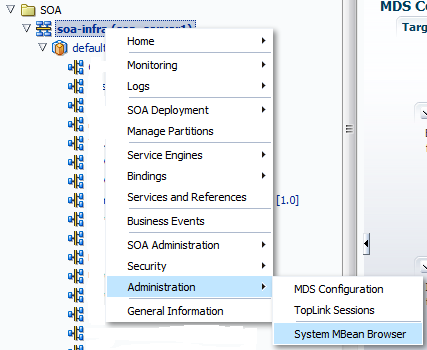
Step1: Just right click on SOA infrastructure and navigate to Administration --> System MBean Browser.
Step2: Then go to Application Defined MBeans --> oracle.soa.config --> Server: soa_server1 --> SCAComposite --> <your SOA composite> --> SCAComposite.SCAComponent and open up the BPEL Component.

Step3: In the BPEL just make required changes to the value of your preference variables and click Apply.

Step4: After that in the MBean configuration only,navigate to Operations tab and then click on save.

Step5: In the next window that opens up,click on Invoke.

Here you go the values of your preference variables are saved permanently.even after the server restart the new value will still persist.If you guys dont know how to set/get preference variable values you can check my post

Hope this post helped you guys.

Happy Learning,
Cheers !!!


Dynamically passing JNDI name to JCA Adapters - SOA 11G

Hi All,

We can pass the JNDI name to any JCA adapter (JMS,DB,File) at runtime as well.All we need to do is configure one property inside the invoke activity that will pass jndi at runtime to the JCA adapter.Just go to the source of your invoke activity where you need to pass the jndi at runtime.

 Then inside the invoke activity add below line:
<bpelx:inputProperty name="jca.jndi" variable="jndiVar"/> in case of BPEL 1.1 and <bpelx:toProperty name="jca.jndi" variable="jndiVar"/> in case of BPEL 2.0 where "jndiVar" is a variable that will contain your jndi name that will be passed at runtime.
Now assign the value to "jndiVar" and place this assign activity before the invoke activity where dynaic jndi needs to be passed.
Deploy and test your composite to verify that jndi is being passed dynamically at runtime.

NOTE: you won't be able to see this property under Invoke --> Properties tab. You have to add it manually by going inside the source of your BPEL process.

Hope it will help you in your implementation.

Happy Learning,
Cheers !!!

Thursday, June 20, 2013

Getting and Setting JMS Header Properties - SOA 11G

Hi Guys,

Sometimes there is requirement where you are required to set some JMS header values and then send the jms message to the client or consumer may interact with you via jms queue and sends some user defined properties in the JMS header.In BPEL 11G, we can easily set or retreive these values.

Setting JMS Header Values


Step1: Click on the invoke activity inside your BPEL process that is calling your JMS adapter for publishing messages in the jms queue.Then click on the source tab of BPEL.
Step2: Inside the invoke activity code add this property <bpelx:inputProperty name="jca.jms.JMSProperty.propertyname" variable="variablename"/>
where propertyname: name of the property you want to set and variablename: variable from which you are passing value to this property.For instance,in out usecase I am setting following properties:

      <bpelx:inputProperty name="jca.jms.JMSProperty.MSG_ID" variable="TransID"/>
      <bpelx:inputProperty name="jca.jms.JMSProperty.FROM_SYSTEM" variable="FROM_SYSTEM"/>   
      <bpelx:inputProperty name="jca.jms.JMSProperty.ServiceName" variable="ServiceName"/>

Make sure you populate all these properties before calling invoke activity,otherwise these properties will contain null/blank values.

Step3: Deploy and test your code.Verify that these values are getting set by looking into the flow trace of your composite.
Step4: Also,you can verify the message in jms queue as well and see if the properties are properly set or not.

Getting JMS Header Values


Step5:Inside your BPEL process,click on the receive activity that is receiving input from the jms adapter and click on source.

Step6: Add this property inside your receive activity: <bpelx:outputProperty name="jca.jms.JMSProperty.propertyname" variable="variablename"/>. It is same as we did for setting the property except the outputProperty tag.In my example, I am retreiving the value of jms header that I set previously.

      <bpelx:outputProperty name="jca.jms.JMSProperty.MSG_ID" variable="TransID"/>
      <bpelx:outputProperty name="jca.jms.JMSProperty.FROM_SYSTEM" variable="FROM_SYSTEM"/>   
      <bpelx:outputProperty name="jca.jms.JMSProperty.ServiceName" variable="ServiceName"/>

     
Create the variables that will store the values of these properties.

Step7: Deploy your code and test your composite.Inside flow trace verify you are able to retreive the jms properties headers value from the JMS message.
In this way you guys can set and get the header properties of any JMS message in SOA 11G.Apart from accessing these values from BPEL,you can also access these values from Mediator.In mediator, they are accessed in the assign step using:

Inbound: $in.property.jca.jms.JMSProperty.<propertyname>
Outbound: $out.property.jca.jms.JMSProperty.<propertyname>

Hope this post of some help to you.

Happy Learning,
Cheers !!!