Showing posts with label SOA. Show all posts

Wednesday, January 29, 2014

Handling Rejected Messages - SOA 11G

Hi Guys,

Was busy past couple of months due to work and all. Finally got time to wrtie a new blog. Today, I would be explaining how do you handle rejection messages in BPEL. Rejection messages are basically the messages your composite receives but its not as per the format expected by your service , due to which BPEL instance do not get created. So your flow doesnot goes into your BPEL and there is no way to handle that exception in your code.

Below is the extract taken from Oracle:

The messages that error out before being posted to the service infrastructure are referred to as rejected messages. For example, the Oracle File Adapter selects a file having data in CSV format and tries to translate it to XML format (using NXSD). If there is any error in the translation, this message is rejected and are not be posted to the target composite.
Primarily, adapters and binding components are the generators of rejected messages.


To handle such scenarios where you need to take specific action if you get rejected messages, you can use fault management framework. Lets do it step by step.

To illustrate this, I have created sample interface that reads a CSV file from a location and there is only single receive activity inside the BPEL that will receive the input.


Based on the CSV file , I have created a sample schema and configured our File adapter to read the file based on this schema.


My composite is already deployed on EM. Lets test it. This is the file that I have placed in input directory.


Instance will be created , since the file is in correct format. Verify by opening the instance and checking your input.


Now create a Fault Policy file and fault bindings file and place it in the folder that has composite.xml.


Open the fault policy file and define a fault policy for the rejected messages in the fault-policies.xml file, stored with the composite.xml file in the JDeveloper project directory. In the file add the name of your service adapter in the faultname section. In our case it is "readFile". And the action define "writeTofile" that will write the rejected message in the location specified with the filename that is given.


Now associate the fault policy with a service endpoint of the composite in fault-bindings.xml, as is done in the following screenshot:


Deploy your composite and place some file in the input directory thats not as per the schema.


New instance wont get genereate. Instead you will see error message under "Faults and Rejected Messages". Click on the error message and open payload. 


Now this failed message will be writtten to the file and the location that we gave in our fault policy. Go to that location and verify the same.

This way , we can handle rejection messages and take appropriate actions depending upon the requirements.

For more information please refer Oracle Documentation: Rejection Messages

Hope this post was useful to you.

Happy Learning,
Cheers 

Friday, October 11, 2013

Unable to Edit Database/File Adapter in JDev - SOA 11G

Hi All,

There is one issue that lots of people faces while importing an existing SOA project into JDeveloper.For instance, you have a composite that is polling records from DB and writing it into some file. After importing when you try to edit DB or File adapter by double clicking the wizard simply wont open up. Strange isnt it.
Even if you reimport the same project it will still not open.What could be the issue here.

The simple solution or workaround you can say is add the below line in your respective WSDL file of File or DB or JMS adapter(any JCA adapter):
<?binding.jca readFile_file.jca?>


where readFile_file.jca is the jca file name of your file adapter. In case of DB Adapters, it would be filename_db.jca and in case of JMS adapter would be filename_jms.jca and hence so on for all other JCA adapters.


Save your WSDL file close it and now double click on your adapter. Bingo its opening now :) Nice isn'it.

Hope this post will help many of you frustrated facing such type of issues.

Happy Learning...

Cheers,
Karan

Wednesday, July 31, 2013

Unit Test Cases tutorial for SOA Composites - Oracle SOA 11G

Hi Everyone,

Today I will be describing how to create, deploy, and run test cases that automate the testing of SOA composite applications. You can also create test cases for testing BPEL process service components included in the SOA composite application. Test cases enable you to simulate the interaction between a SOA composite application and its web service partners before deployment in a production environment. This helps to ensure that a process interacts with web service partners as expected when it is ready for deployment to a production environment.

In this type of testing, wires, service binding components, service components (such as BPEL processes and Oracle Mediator service components), and reference binding components are tested.

Overview of Test Suites

Test suites consist of a logical collection of one or more test cases. Each test case contains a set of commands to perform as the test instance is executed. The execution of a test suite is known as a test run.

Before starting let me explain you two basic terms that will be used while creating test cases. These are

Assertions : You perform assertions to verify variable data or process flow. Assertions enable you to validate test data in an entire XML document as a process is executed. This is done by extracting a value and comparing it to an expected value.

Emulations: These are used to simulate the message data that your SOA composite application receives from web service partners.

Usecase:


I have created a sample SOA application having BPEL service exposed as web service and wired with DB adapter which is used to call a stored proceudre that I have created.The input for this interface is a string variable and its value would be passed to stored procedure as an input parameter by our BPEL process.In response stored procedure will return response based upon the input passed.Below is the list of input and output that would be returned by SP:

Input: 1 , Output: you entered one
Input: 2 , Output: you entered two
Input: 123(any random value) , Output: Default Output

I will be creating test case for first and last input only to show you guys how it works.

Step1: In project explorer,navigate to "testsuites" then right click and click on "Create Test Suite".
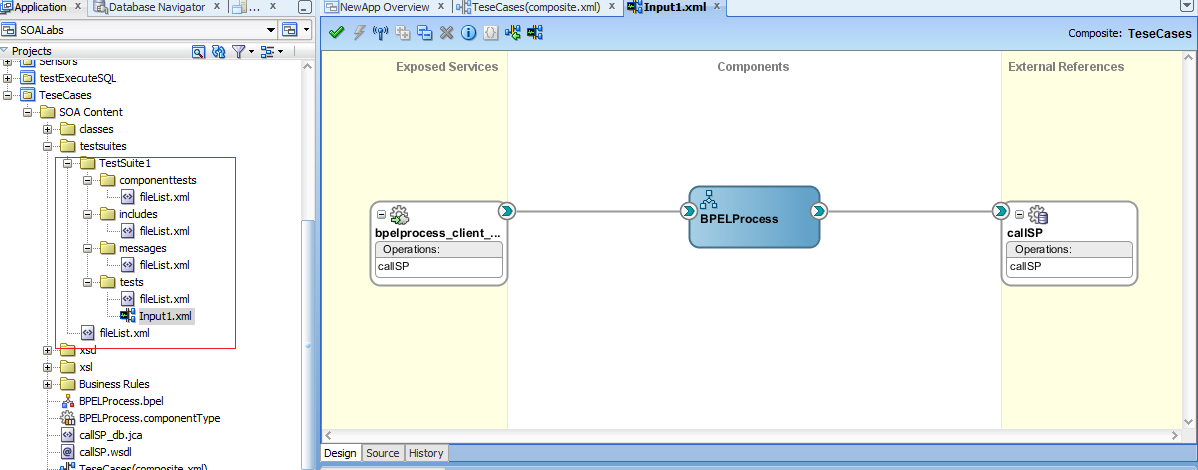
Step2: Give the name as "TestSuite1" and click ok.
Step3: Another window will open up prompting for test case name.Give it as Input1 and click OK.
Step4: You will under project explorer test suite is created and your composite will open in test mode.
Step5: Now, the input that would be passed to our interface, we will add.Right click on your exposes services partner link and click "Create Initiate Messages".
Step6: Initiate message window will pop up.Here either you can pass the input payload by loading from a file or manually.I will pass it manually.Click on generate sample button.It will generate sample input payload with dummy value.Since,we are testing for input 1,pass 1 in the input.
Step7: Now right click on wire between BPEL component and DB adapter in the external references lane and click "Create Wire actions".
Step8: Window will pop up with operations in the left pane and Asserts and Emulations tab on the right pane.Here we will pass input that is expected by our DB adapter.Under asserts tab,click on "+".
Step9: Assert Input --> Generate Sample. Again pass 1 in the input payload.
Step10: Similarly for asserting output,click on "+" again and add Assert ouput with correct value in the response that we are expecting from this reference.Please note assertions means the values that are expected by composite and emulation means emulating dummy response rather than calling the external web wervices/references in actual.Emulations for now leave it, I will explain it later on in this post.
Step11: Your test case will look like this.
Step12:  Likewise,add one more test case with name as "RandomInput" to test the composite for scenarios in which random values are passed.

Step13: As we did for our first test case ,create initiate message with input as "123".
Step14: In this case we are expecting output as "Default Output".

Step15: Now we are good to go.Save all and deploy your composite.Open up your composite on EM and click on Unit test tab.Here you will see two tabs beneath "Unit Test" namely "Test Cases" and "Test Runs".You will see two test cases that we had created earlier.you can either execute both the test cases together or one by one.I will be executing them together by clicking on execute.
Step16: Window will pop up asking you to give a name to this test run.Enter "SampleTestRun" and OK.
Step17: You will be immediately shifted to "Test Runs" tab where you will see the status of your test cases.It will be showing as "RUNNING".Keep on clicking Refresh Test status after some time.
Step18: You will see that test cases has been executed successfully.

Step19: Click on input1.xml which is our first test case and click on the "XML" link.Window will pop up showing you the value that was passed to this test case and value that was expected.If both matches then test case passes.You will see 1 in both actual and expected payload.
Step20: Similarly check for output of our first test case again by clicking on second "XML" blue link and verify the outputs.
Step21: Likewise output for second test case.
Step22: Now how the test case behaves in case value expected and actual value does not match.Go back to JDev and open first test case and edit wire actions section where we had added assertions earlier both for input and output.Now what I will do is,simulate the output that stored procedure returns.Means when we will run this test case ,our DB adapter will not be invoked and in turn emulated output will be returned back by composite in the actual value section.Go to Emulate tab and click on Add.
Step23: Add emulate output and enter dummy data in the output paylaod.
Step24:Save and deploy.Test your this test case again.This time its state will be shown as "Failed" which means our test case did not pass.
Step25: Open up the xml and see the value in actual and expected value section is different.Hence,it failed.
In this way you can add number of test cases you want to your SOA composite application and before deploying them to production you can test your composites functionality whether they are behaving in expecting manner or not.For more information refer Oracle documentation HERE

Hope this post help you guys.

Happy Learning,
Cheers !!!

Monday, July 1, 2013

Dynamically passing JNDI name to JCA Adapters - SOA 11G

Hi All,

We can pass the JNDI name to any JCA adapter (JMS,DB,File) at runtime as well.All we need to do is configure one property inside the invoke activity that will pass jndi at runtime to the JCA adapter.Just go to the source of your invoke activity where you need to pass the jndi at runtime.

 Then inside the invoke activity add below line:
<bpelx:inputProperty name="jca.jndi" variable="jndiVar"/> in case of BPEL 1.1 and <bpelx:toProperty name="jca.jndi" variable="jndiVar"/> in case of BPEL 2.0 where "jndiVar" is a variable that will contain your jndi name that will be passed at runtime.
Now assign the value to "jndiVar" and place this assign activity before the invoke activity where dynaic jndi needs to be passed.
Deploy and test your composite to verify that jndi is being passed dynamically at runtime.

NOTE: you won't be able to see this property under Invoke --> Properties tab. You have to add it manually by going inside the source of your BPEL process.

Hope it will help you in your implementation.

Happy Learning,
Cheers !!!

Sunday, April 28, 2013

Understanding Service Oriented Architecture(SOA)

Service-oriented architecture (SOA) is a software design methodology based on structured collections of discrete software modules, known as services, that collectively provide the complete functionality of a large or complex software application.

SOA defines how to integrate widely disparate applications for a Web-based environment and uses multiple implementation platforms. Rather than defining an API, SOA defines the interface in terms of protocols and functionality. An endpoint is the entry point for such a SOA implementation. XML is often used for interfacing with SOA services.

Oracle SOA Suite 

Oracle SOA Suite is a comprehensive, hot-pluggable software suite to build, deploy and manage Service-Oriented Architectures (SOA). The components of the suite benefit from common capabilities including consistent tooling, a single deployment and management model, end-to-end security and unified metadata management. Oracle SOA Suite enables system developers to set up and manage services and to orchestrate them into composite applications and business processes.

Components

The products contained in this suite are listed below:


BPEL Process Manager: BPEL is the standard for assembling a set of discrete services into an end-to-end process flow, radically reducing the cost and complexity of process integration initiatives. Oracle BPEL Process Manager offers a comprehensive and easy-to-use infrastructure for creating, deploying and managing BPEL business processes. 

Business Rules: Oracle Business Rules is a high performance lightweight business rules product that addresses the requirements for agility, business control, and transparency. It is part of the Fusion Middleware stack and integrates seamlessly across the entire Oracle SOA Suite and BPM Suite stack. It is also a core component for present and future Oracle Fusion Middleware and Fusion Applications products.

Oracle Service Bus: Oracle Service Bus transforms complex architectures into agile integration networks by connecting, mediating, and managing interactions between services and applications. Oracle Service Bus delivers low-cost, standards-based integration for mission critical SOA environments where extreme performance and scalability are requirements.

Oracle Web Service Manager: Oracle Web Services Manager offers a comprehensive and easy-to-use solution for policy management and security of service infrastructure. It provides visibility and control of the policies through a centralized administration interface offered by Oracle Enterprise Manager.

Human Workflow: Human Workflow component is responsible for managing the lifecycle of human tasks, including creation, assignment, expiration, deadlines, and notifications, as well as its presentation to end users. It supports sophisticated dynamic task routing leveraging declarative patterns and tight integration with business rules. The three main sub-components of Human Workflow are a Task editor, Task Service Engine, and a Worklist application.

Oracle BAM: Oracle Business Activity Monitoring (Oracle BAM) gives business executives the ability to monitor their business services and processes in the enterprise, to correlate KPIs down to the actual business process themselves, and most important, to change business processes quickly or to take corrective action if the business environment changes.